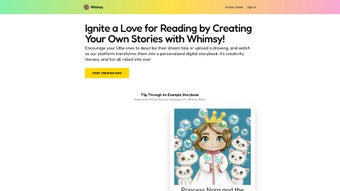

Download WhimsyWorks – Free AI-Powered Reading Adventures for Kids on Windows, Mac, Android & iOS
WhimsyWorks is a revolutionary web-based tool that transforms reading into an immersive, interactive experience for children. By harnessing the power of GPT-4 AI, this platform crafts personalized 'choose-your-own-adventure' stories tailored to each child’s interests and reading level. Whether your child loves dinosaurs, space explorers, or magical rainbows, WhimsyWorks generates dynamic narratives that keep them engaged from start to finish.
Designed with both kids and parents in mind, the app features intuitive navigation, real-time customization, and a secure, ad-free environment. It’s completely free to try, making it an accessible choice for families seeking to nurture literacy through fun and creativity. With endless story variations, WhimsyWorks encourages independent thinking, imagination, and reading confidence—key ingredients for lifelong learning.
This innovative software is perfect for educators and parents alike who want to make reading enjoyable and meaningful. No downloads are required—just open your browser and begin a new adventure today.
Key Features of WhimsyWorks
WhimsyWorks stands out in the crowded educational tech space by combining cutting-edge AI with child-centered design. At its core, the platform uses GPT-4 to generate rich, dynamic stories that adapt to a child’s preferences and reading ability. Parents can easily customize stories by selecting themes like fantasy, science, or adventure, ensuring relevance and engagement. One of the most impressive features is the real-time decision-making mechanic—children choose their next move in the story, which instantly shapes the narrative, promoting critical thinking and agency.
Another standout feature is the adaptive reading level adjustment. WhimsyWorks analyzes the child’s reading proficiency and modifies vocabulary and sentence complexity accordingly. This ensures that every story is challenging yet achievable, supporting gradual skill development. The platform also includes voice narration, which helps younger readers follow along and improves comprehension. Interactive elements like clickable choices, animated characters, and sound effects make the experience feel like a digital game, not a lesson.
For parents and educators, WhimsyWorks offers a dashboard to track progress, view story history, and adjust settings. The tool is entirely secure, with no third-party ads or data collection, making it a trusted choice for families. With continuous AI updates, the platform evolves to offer even more diverse and high-quality content. Whether used at home or in the classroom, WhimsyWorks turns every reading session into a unique adventure.
- AI-generated personalized stories using GPT-4 technology
- Customizable themes: dinosaurs, space, magic, animals, and more
- Adaptive reading levels for age and skill progression
- Interactive 'choose-your-own-adventure' gameplay mechanics
- Text-to-speech narration for improved comprehension
- Parent dashboard with progress tracking and settings control
- Secure, ad-free, and child-safe browsing environment
- Available on all devices: Windows, Mac, Android, iOS via web browser
How to Install and Use WhimsyWorks
One of the biggest advantages of WhimsyWorks is its simplicity—no installation required. As a web app, it runs directly in any modern browser, making it accessible across devices. To get started, visit the official WhimsyWorks website and click “Start a New Adventure.” No sign-up is needed for the free trial, though creating a free account allows you to save story progress and access personalized settings.
Once on the homepage, parents or children can select a theme from the drop-down menu—options include “Dinosaur Safari,” “Galactic Explorer,” or “Rainbow Kingdom.” After choosing, the platform prompts users to set the reading level (Beginner, Intermediate, Advanced). This ensures the story matches the child’s current literacy stage. The AI then generates a unique narrative with interactive choices at key moments.
During the story, children click on options like “Climb the volcano” or “Follow the glowing path,” and the story evolves in real time. Each decision leads to new scenes, characters, and challenges, keeping engagement high. Parents can guide their child through the story or let them explore independently. The built-in voice narration reads each line aloud, which is especially helpful for early readers.
For educators, WhimsyWorks integrates seamlessly into classroom reading activities. Teachers can assign specific story themes to match curriculum topics or student interests. The progress dashboard helps track reading habits and comprehension over time. With regular AI updates, the platform continuously introduces new storylines and features, ensuring long-term value. Whether used for 10 minutes a day or during reading time, WhimsyWorks makes learning to read feel like play.
Compatibility and System Requirements
WhimsyWorks is designed for universal accessibility, supporting all major operating systems and devices. It runs smoothly on Windows 10 and later, Mac OS X 10.15 or higher, Android tablets and smartphones (with Chrome or Firefox), and iOS devices (iPhone and iPad) using Safari or Chrome. Since it’s a web-based application, no downloads or installations are required—just open your browser and go.
The platform is optimized for both desktop and mobile use, with responsive design that adjusts to screen size. This means children can enjoy stories on a large monitor at home or on a tablet during travel. Minimal bandwidth is required—just a stable internet connection. WhimsyWorks is lightweight and fast, loading stories in seconds even on older devices.
For schools and libraries, the app is compatible with district-wide web filters and secure networks. It does not require admin rights or special software, making it ideal for shared devices. The secure login system protects user data, and all content is pre-screened to ensure age-appropriate material. Whether used at home or in a public setting, WhimsyWorks delivers a consistent, reliable experience across platforms.
- Windows 10, 11
- macOS 10.15 or later
- Android 8.0+
- iOS 13+
- Compatible with Chrome, Firefox, Safari, Edge
- Works on tablets, smartphones, desktops, and laptops
- No installation, no downloads, no plugins needed
Pros and Cons of WhimsyWorks
WhimsyWorks offers a compelling blend of innovation and usability, making it a top choice for families and educators. Its biggest strength lies in personalization—each story is uniquely crafted based on a child’s interests and reading level, ensuring maximum engagement. The AI-powered narrative engine keeps content fresh and dynamic, eliminating the risk of repetition common in traditional reading apps.
Another major advantage is the focus on developing real reading skills. By encouraging decision-making and comprehension through interactive choices, children naturally improve their vocabulary, fluency, and critical thinking. The voice narration feature supports early readers and those with learning differences, promoting inclusivity. Plus, the free trial makes it easy to test the platform risk-free.
However, there are a few minor drawbacks. Since it’s web-based, a stable internet connection is required—offline access isn’t available yet. Some users may also find the initial customization steps slightly overwhelming, though the intuitive interface reduces this issue. Additionally, while the free version is robust, premium features like unlimited story history and advanced analytics are locked behind a subscription.
- Pros:
- Truly personalized AI-generated stories
- Adaptive reading levels for skill growth
- Engaging, game-like storytelling experience
- Free to try with no ads or data tracking
- Works on all devices via browser
- Safe, secure, and child-friendly interface
- Cons:
- Requires internet connection (no offline mode)
- Advanced features require subscription
- Initial setup may need parental guidance
- Story length varies; some may be shorter than expected
- Not available as a standalone app (web-only)
Frequently Asked Questions (FAQ)
Here are answers to common questions about WhimsyWorks, helping you get the most out of this innovative reading tool.
-
Is WhimsyWorks free to use?
Yes, WhimsyWorks offers a free trial that allows unlimited access to its core features. You can create personalized stories, adjust reading levels, and enjoy interactive adventures at no cost. While premium features are available through a subscription, the free version is fully functional and ideal for most families.
-
Can I use WhimsyWorks on my child’s tablet or smartphone?
Absolutely. WhimsyWorks is fully compatible with Android tablets, iPads, iPhones, and other mobile devices. Simply open your browser and visit the website—no app download is needed. The responsive design ensures a smooth experience on any screen size.
-
Does WhimsyWorks support multiple reading levels?
Yes, the platform adapts stories to three reading levels: Beginner, Intermediate, and Advanced. Parents can select the appropriate level based on their child’s age and reading ability. The AI adjusts vocabulary and sentence structure to match, ensuring the story is both fun and educational.
-
Is my child’s data safe on WhimsyWorks?
Yes, WhimsyWorks prioritizes child safety. The platform does not collect personal data, display ads, or use third-party trackers. All content is reviewed for age-appropriateness, and the interface is designed to be distraction-free and secure.
-
How often does WhimsyWorks update its stories?
WhimsyWorks uses AI to generate new stories continuously. While the core engine is updated regularly, new themes and features are introduced monthly. This ensures a fresh experience with every adventure.
Final Thoughts: Why WhimsyWorks Is a Must-Try for Kids’ Reading Growth
WhimsyWorks isn’t just another reading app—it’s a transformative tool that turns every story into an unforgettable journey. By combining AI intelligence with playful storytelling, it helps children build reading confidence, expand their vocabulary, and fall in love with books. The personalized approach ensures no two adventures are the same, keeping kids excited and curious.
Whether you’re a parent looking to spark a reading habit or a teacher aiming to make literacy fun, WhimsyWorks delivers real value. Its compatibility across Windows, Mac, Android, and iOS makes it accessible to nearly every family. And with a free trial that offers full access, there’s no reason not to give it a try.
Download WhimsyWorks today and watch your child’s imagination soar—one interactive story at a time.



.png)



